


BROWSER INTELLIGENCE
Cyber Incident Intelligence. Now in Your Browser.
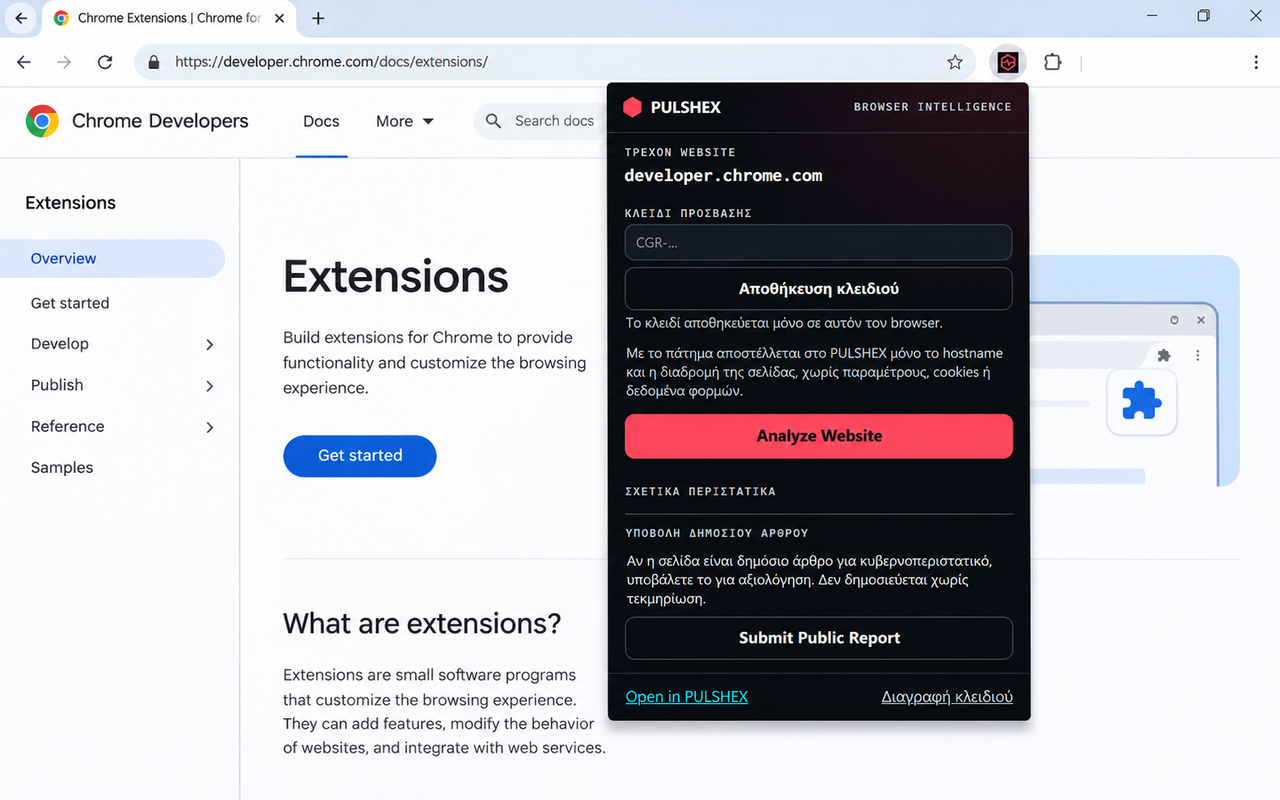
PULSHEX Browser Intelligence is the official PULSHEX Chrome extension. It shows documented cybersecurity incidents related to the websites you visit, together with their sources.
FEATURES
Key features
One-click lookup
Check whether PULSHEX has recorded documented incidents for the website you are viewing.
Named sources
Each result comes with its supporting sources and a link to the full record on PULSHEX.
Submit Public Report
Send a public cyber incident article for evaluation. Nothing is published without supporting evidence.
Minimal data
Only the hostname and page path are sent, and only when you ask.
HOW IT WORKS
Install and use in six steps
- Step 1: Install the extension from the Chrome Web Store.
- Step 2: Obtain your PULSHEX access key from the Access page.
- Step 3: Open the extension and save your key.
- Step 4: Visit a public HTTPS website.
- Step 5: Click “Analyze Website”.
- Step 6: Review available documented cyber incidents and their supporting sources.
With “Submit Public Report” you can send the page of a public cyber incident article for evaluation. Submission does not mean publication; PULSHEX records only incidents with sufficient evidence.
PULSHEX provides documented incident intelligence, not real-time vulnerability scanning or a guarantee that a website is safe.
Access key setup
Use the same key you received with your purchase (it starts with “CGR-”). Paste it into the extension’s access key field and click “Save key”. If you do not have a key, get one from the Access page.
Go to the Access pagePRIVACY & SECURITY
What is sent and what is not
- Analysis is only started by you.
- Only the HTTPS hostname and URL path are sent for the lookup, without query parameters or fragments.
- The access key is stored in the extension’s local storage in Chrome and sent to PULSHEX only to verify your subscription.
- The extension does not read cookies, form fields or website content.
- The absence of documented incidents does not guarantee that a website is secure.
FAQ
Frequently asked questions
Do I need an access key?
Yes. Incident lookup requires an active PULSHEX key, available from the Access page. No account is needed.
Does the extension scan the website for vulnerabilities?
No. PULSHEX provides documented incident intelligence, not real-time vulnerability scanning or a guarantee of website safety.
What happens to articles I submit?
They are evaluated under the same evidence rules as the rest of the platform. Nothing is published without sufficient evidence.
How do I remove my key?
Open the extension and click “Delete key”, or uninstall the extension.
Which browsers are supported?
The extension is available through the Chrome Web Store for Google Chrome. Version 0.1.0 has a Greek interface.